Many years ago, in 2012, I wrote an extension method which converted an IEnumerable to a multi-key dictionary. I previously blogged about the use-case of the multi-key dictionary here.
This was written in VB.Net which was less unpopular at that time. Today have I have converted the code to C# and set up a proper repository in Github.
The old gist is no longer there. The only step I have done with the conversion is just making sure that it complies. In the upcoming weeks/months I will write some tests to establish that is still working as intended. The github project can be found here.
“Shipping first time code is like going into debt. A little debt speeds development so long as it is paid back promptly with a rewrite. The danger occurs when the debt is not repaid. Every minute spent on not-quite-right code counts as interest on that debt. Entire engineering organizations can be brought to a standstill under the debt load of an unconsolidated implementation, object-oriented or otherwise.” – Ward Cunningham
I asked this question to one developer who is extremely passionate of programming. The answer I got what was quite inspiring and I thought it would be great to share this experience.
“My first experience with programming was when I was in school. Unfortunately, I didn’t have a computer to play with and I learned programming by reading books. Therefore, I used to write programs on paper and enjoyed writing code on paper. One day, I came to know of a person who has a computer and asked him if I can program in his computer and he kindly agreed. So I went to see him with some sheets of paper for a program and executed it. Fortunately, it executed as intended and I was very happy with the result”
I found this experience as very inspiring and I thought you would too.
This is an experimental implementation of a Watch to evaluate .NET objects in Runtime using VB.NET. One of the key feature of this object watch is that you can even evaluate Lambda Expressions which is not supported in the current(2012) or previous versions of visual studio. That said, most of these features are still at its infancy. Currently the watch supports member access using properties including indexer properties, method invocations and also supports LINQ Expressions. The result are serialized to JSON with the help of Newtonsoft’s JSON.NET
For the purpose of demonstration, we have a collection of objects (Students) attached to a Web Cache. This is done so the Cache can persist the collection(s) in the memory.
Dim students As New List(Of Student)
students.Add(New Student With {.Name = "Tony", .Age = 27, .Batch = 1})
students.Add(New Student With {.Name = "Peter", .Age = 24, .Batch = 2})
students.Add(New Student With {.Name = "James", .Age = 28, .Batch = 1})
students.Add(New Student With {.Name = "Adam", .Age = 27, .Batch = 2})
students.Add(New Student With {.Name = "Amit", .Age = 19, .Batch = 1})
students.Add(New Student With {.Name = "Rene", .Age = 45, .Batch = 2})
students.Add(New Student With {.Name = "Ash", .Age = 35, .Batch = 1})
students.Add(New Student With {.Name = "John", .Age = 20, .Batch = 2})
students.Add(New Student With {.Name = "Rich", .Age = 27, .Batch = 1})
 'Now convert the list to a dictionary.
 Dim students2 As Dictionary(Of String, Student) = students.ToDictionary(Function(o) o.Name)
Now let’s start querying.
Property Access
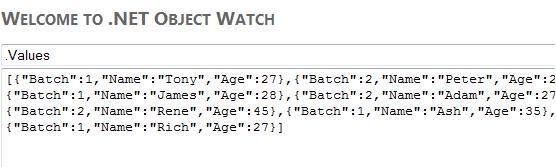
Gets a simple property. The query syntax starts with a dot (“.”) The dictionary students2, has few properties, for the purpose of demonstration we will be using two prominent properties Keys and Values
Indexer Properties
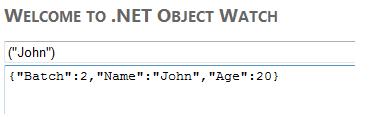
As indexer takes in property parameters, the query takes parameters similar to indexer properties in .NET
Method Calls
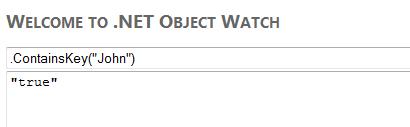
Similar to how a method is called in .NET, method’s starts with a “.”, followed by the name as the arguments. Syntax is similar to how methods are called in .NET
Enumerable Extension methods
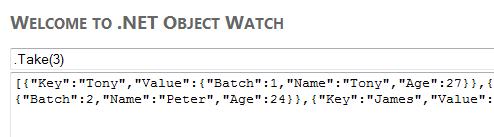
Probably one of the key feature of this watch is it’s ability to query collection of objects using Lambda expressions. At the moment, there are support for 3 key Enumerable functions which are Where, Select and Take.
Enumerable.Take method
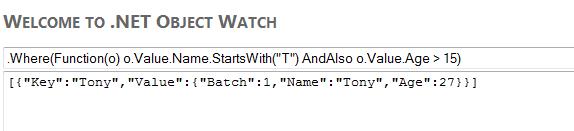
Enumerable.Where method
Where method takes a predicate, firstly parsed and converted to expression lambda and then it used to evaluate each item in the collection.
Enumerable.Select method
Similar to .Where, instead it project a single element of each item in a collection.
Fluent Style
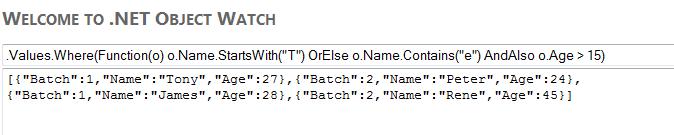
One of the key demand of a watch is to evaluate set of statements/expression fluently. Which implies you can query sequentially in any combination provided the query follows syntax and semantics of VB. In the example below, the first query uses a property which returns a value collection, and then that result set is evaluated with a predicate yielding a new result set.
The motive of this project is to demonstrate few tricks and black arts in watching objects at run time and runtime method executions. Using the code is completely at the users risk. Therefore, contributors of this project WILL NOT be liable for any damages caused.
The intention of this post is NOT to suggest any particular method for performing equality check but just to show some interesting data related to performance when equality check is done for some of the fundamental datatypes in .NET.
How the test is done
A collection of million items of the data type is stored into a list. Iterating through the items in the collection, each item is checked for equality with another value. Time taken for checking the equality is noted. The chart shown below shows the results obtained. The value along the y axis denotes the time in ticks, where as on the x axis, the datatype used to perform the test. Lower the value in y axis, faster it is.
Conclusions
The following can be deduced
Equality check using == operator for System.Int32 and Double are considerably faster than .Equals() method.
Decimal, Guid, DateTime and Nullable(Of Integer) have almost same performance cost for .Equals() and == methods.
.Equals() method, compared to == operator does faster equality checks for Strings
   Dim stopWatch As New Stopwatch

        Dim nullableIntList As New List(Of Nullable(Of Integer))
        Dim intList As New List(Of Integer)

        Dim doubleList As New List(Of Double)
        Dim decimalList As New List(Of Decimal)

        Dim guidList As New List(Of Guid)
        Dim dateList As New List(Of DateTime)

        Dim stringList As New List(Of String)
        Dim startDate As New DateTime(1, 1, 1)

        For i As Integer = 0 To 1000000

            nullableIntList.Add(i)
            intList.Add(i)
            doubleList.Add(CDbl(i))
            decimalList.Add(CDec(i))

            guidList.Add(New Guid)

            dateList.Add(startDate)
            stringList.Add(startDate.ToLongDateString)
            startDate = startDate.AddDays(1)

        Next

        Dim checkResult As Boolean = False
        Dim intToCompare As Integer = intToCompare

        stopWatch.Start()

        For Each nullableInt In intList

        Next

        stopWatch.Stop()

        Debug.WriteLine("looping throught items took " & stopWatch.ElapsedTicks)
        stopWatch.Restart()

        For Each nullableInt In intList
            checkResult = (nullableInt = intToCompare)
        Next

        stopWatch.Stop()

        Debug.WriteLine("== for Nullable Int took (ticks)" & stopWatch.ElapsedTicks)
        Debug.WriteLine("== for Nullable  Int took (ms)" & stopWatch.ElapsedMilliseconds)

        stopWatch.Restart()
        For Each nullableInt In nullableIntList
            checkResult = (nullableInt.Equals(intToCompare))
        Next

        stopWatch.Stop()

        Debug.WriteLine(".Equals for Nullable Int took (ticks)" & stopWatch.ElapsedTicks)
        Debug.WriteLine(".Equals for Nullable Int took (ms)" & stopWatch.ElapsedMilliseconds)

        stopWatch.Restart()
        For Each intItem In intList
            checkResult = (intItem = intToCompare)
        Next

        stopWatch.Stop()

        Debug.WriteLine("== for Int took (ticks)" & stopWatch.ElapsedTicks)
        Debug.WriteLine("== for Int took (ms)" & stopWatch.ElapsedMilliseconds)

        stopWatch.Restart()
        For Each intItem In intList
            checkResult = (intItem.Equals(intToCompare))
        Next

        stopWatch.Stop()

        Debug.WriteLine(".Equals for Int took (ticks)" & stopWatch.ElapsedTicks)
        Debug.WriteLine(".Equals for Int took (ms)" & stopWatch.ElapsedMilliseconds)

        Dim doubleToCompare As Double = 3.4

        stopWatch.Restart()
        For Each dblItem In doubleList
            checkResult = (dblItem = doubleToCompare)
        Next

        stopWatch.Stop()

        Debug.WriteLine("== for Double took (ticks)" & stopWatch.ElapsedTicks)
        Debug.WriteLine("== for Double took (ms)" & stopWatch.ElapsedMilliseconds)

        stopWatch.Restart()
        For Each dblItem In doubleList
            checkResult = (dblItem.Equals(doubleToCompare))
        Next

        stopWatch.Stop()

        Debug.WriteLine(".Equals for Double took (ticks)" & stopWatch.ElapsedTicks)
        Debug.WriteLine(".Equals for Double took (ms)" & stopWatch.ElapsedMilliseconds)

        Dim decimalToCompare As Decimal = 3.4D

        stopWatch.Restart()
        For Each decItem In decimalList
            checkResult = (decItem = decimalToCompare)
        Next

        stopWatch.Stop()

        Debug.WriteLine("== for Decimal took (ticks)" & stopWatch.ElapsedTicks)
        Debug.WriteLine("== for Decimal took (ms)" & stopWatch.ElapsedMilliseconds)

        stopWatch.Restart()
        For Each decItem In decimalList
            checkResult = (decItem.Equals(decimalToCompare))
        Next

        stopWatch.Stop()

        Debug.WriteLine(".Equals for Decimal took (ticks)" & stopWatch.ElapsedTicks)
        Debug.WriteLine(".Equals for Decimal took (ms)" & stopWatch.ElapsedMilliseconds)

        Dim guidToCompare As Guid = New Guid

        stopWatch.Restart()
        For Each guidItem In guidList
            checkResult = (guidItem = guidToCompare)
        Next

        stopWatch.Stop()

        Debug.WriteLine("== for Guid took (ticks)" & stopWatch.ElapsedTicks)
        Debug.WriteLine("== for Guid took (ms)" & stopWatch.ElapsedMilliseconds)

        stopWatch.Restart()
        For Each guidItem In guidList
            checkResult = (guidItem.Equals(guidToCompare))
        Next

        stopWatch.Stop()

        Debug.WriteLine(".Equals for Guid took (ticks)" & stopWatch.ElapsedTicks)
        Debug.WriteLine(".Equals for Guid took (ms)" & stopWatch.ElapsedMilliseconds)

        Dim dateToCompare As DateTime = DateTime.Now.Date

        stopWatch.Restart()

        For Each dateItem In dateList
            checkResult = (dateToCompare = dateItem)
        Next

        stopWatch.Stop()

        Debug.WriteLine("== for DateTime took (ticks)" & stopWatch.ElapsedTicks)
        Debug.WriteLine("== for DateTime took (ms)" & stopWatch.ElapsedMilliseconds)

        stopWatch.Restart()

        For Each dateItem In dateList
            checkResult = (dateItem.Equals(dateItem))
        Next

        stopWatch.Stop()

        Debug.WriteLine(".Equals for DateTime took (ticks)" & stopWatch.ElapsedTicks)
        Debug.WriteLine(".Equals for DateTime took (ms)" & stopWatch.ElapsedMilliseconds)

        Dim stringToCompare As String = "Hello World!"

        stopWatch.Restart()

        For Each stringItem In stringList
            checkResult = (stringItem = stringToCompare)
        Next

        stopWatch.Stop()

        Debug.WriteLine("== for String took (ticks)" & stopWatch.ElapsedTicks)
        Debug.WriteLine("== for String took (ms)" & stopWatch.ElapsedMilliseconds)

        stopWatch.Restart()

        For Each stringItem In stringList
            checkResult = (stringItem.Equals(stringToCompare))
        Next

        stopWatch.Stop()

        Debug.WriteLine(".Equals for String took (ticks)" & stopWatch.ElapsedTicks)
        Debug.WriteLine(".Equals for String took (ms)" & stopWatch.ElapsedMilliseconds)

        Console.ReadKey()
There is a significant difference in how .Equals method and == operator methods performs. The difference is subject to what type of object it is, whether is a value type or a reference type. With an exception to String which is a reference type which overloads the == operator.
The .Equals method is a virtual method and it is implemented in the Object class. This function can be overridden by any class and where as == is an operator which can be overloaded by any class (Operator overloading). For the valuetypes the default implementation of System.Object methods including .Equals is overridden in System.Valuetype class (MSDN). And for value types “If none of the fields of the current instance and obj(parameter passed to the function) are reference types, the Equals method performs a byte-by-byte comparison of the two objects in memory. Otherwise, it uses reflection to compare the corresponding fields of obj and this instance.” (MSDN). This is a significantly slower especially when reflection is employed to find the equality.
Having said that some of the valuetypes does have .Equals methods which takes in the object to compare which is of the same type of the instance. For reference types .Equals checks content equality and where as == operator looks for referential equality(Is operator in VB.NET).
The overloaded operator == is a more readable way to check the equality especially for value types and for strings which overloads == operator. Hence my suggestion is for value types and for strings always use the operators and when you have to do content equality for reference types use the .Equals() method.
When querying a large collection which consists of millions of items, you may encounter some serious performance issues. If you are using an unordered collection, In worst case scenario it will take O(n) to fetch an item. Where as is in a sorted collection, it will be search better than that of an unordered collection – with a performance complexity O(log n). Where as with a dictionary it is a constant time O(1) and offers the best deal.
Unfortunately, a dictionary can only accept one key. What if you have to query on other parameters without affecting the performance. Nested dictionaries is “an” answer.(Not always though, if you need perform comparison)
A sample declaration is as follows
Dim dict As Dictionary(Of Integer, Dictionary(Of Long, Dictionary(Of Integer, Dictionary(Of String, Product))))
Now creating such a nested dictionary is not an easy work. For Each column, For Each order, you have tailor the dictionary and there is no “abstract” silver bullets to ease the creation of such a dictionary.
As for future convenience I just created a simple extension to IEnumerable which will convert to a “MultiKeyDictionary”.
Here is a simple walkthrough:
Dim students As New List(Of Student)
students.Add(New Student() With {.Age = 10, .Batch = 1231456, .Name = "Tony", .Year = 2012})
students.Add(New Student() With {.Age = 11, .Batch = 1231435, .Name = "James", .Year = 2013})
students.Add(New Student() With {.Age = 10, .Batch = 1231456, .Name = "Andy", .Year = 2012})
<ExtensionAttribute()>
 Public Function ToMultiKeyDictionary(Of TSource, TSecKey)(ByVal source As IEnumerable(Of TSource), ByVal ParamArray func() As Func(Of TSource, TSecKey)) As IDictionary
 Dim reverseCollection As New Dictionary(Of Integer, Type)
 Dim functionsCount As Integer = func.Count
 Dim dictTypeCollection As New List(Of IDictionary)
Dim instanceOfCurrentDictionaryArgument As New Object
 Dim dictionaryArgQueue As Object = Nothing
 Dim dictionaryTypes As New List(Of Type)
 For i = 0 To functionsCount - 1
 reverseCollection.Add(i, source.Select(func(func.Count() - (i + 1))).FirstOrDefault().GetType())
 Next
 Dim typeOfGenericDictionary As Type
 Dim dictionaryTypeArgs() As Type
 Dim newConstructedType As Type
 Dim currentDictionaryInstance As IDictionary
For i = 0 To reverseCollection.Count - 1
If reverseCollection(i) IsNot GetType(String) Then
instanceOfCurrentDictionaryArgument = Activator.CreateInstance(reverseCollection(i))
Else
 instanceOfCurrentDictionaryArgument = String.Empty
End If

If instanceOfCurrentDictionaryArgument IsNot Nothing AndAlso dictionaryArgQueue IsNot Nothing Then
typeOfGenericDictionary = GetType(Dictionary(Of ,))
 dictionaryTypeArgs = {instanceOfCurrentDictionaryArgument.GetType(), dictionaryArgQueue.GetType()}
 newConstructedType = typeOfGenericDictionary.MakeGenericType(dictionaryTypeArgs)
 currentDictionaryInstance = Activator.CreateInstance(newConstructedType)
 dictionaryTypes.Add(newConstructedType)
 dictionaryArgQueue = currentDictionaryInstance
 Else
 dictionaryArgQueue = instanceOfCurrentDictionaryArgument
 End If
 Next
 Dim dict As IDictionary = Activator.CreateInstance(dictionaryTypes.Last())
 'If dict IsNot Nothing Then
 Dim queueObj As Object
 For Each item In source
Dim currentItem = item

Dim itemAddedFlag As Boolean = False
 Dim currentItemInCollection As IEnumerable(Of TSource)
Dim iterDict As IDictionary = dict 'Reset dictionary
For i = 0 To func.Count - 1
 currentItemInCollection = {currentItem}
Dim currentKey As TSecKey = currentItemInCollection.Select(func(i)).FirstOrDefault()
If iterDict.Contains(currentKey) AndAlso iterDict(currentKey) IsNot Nothing Then
 iterDict = iterDict(currentKey)
 Else
queueObj = Nothing
 For k = 0 To reverseCollection.Count - 1
If queueObj Is Nothing Then
queueObj = currentItemInCollection.Select(func(functionsCount - (k + 1))).FirstOrDefault()
Else
Dim curObject As Object = currentItemInCollection.Select(func(functionsCount - (k + 1))).FirstOrDefault()
 Dim currentDictionaryFromReverse As IDictionary = Activator.CreateInstance(dictionaryTypes(k - 1))
 If iterDict.GetType() = currentDictionaryFromReverse.GetType() Then
iterDict.Add(curObject, queueObj)
 itemAddedFlag = True
 Exit For
End If
 currentDictionaryFromReverse.Add(curObject, queueObj)
 queueObj = currentDictionaryFromReverse
End If
Next
If itemAddedFlag Then
 Exit For
 End If
 End If
Next
 Next
Return dict
End Function
One of the main benefit of using Generic List to Array is it convenience to Add new items without exposing the re-initialization details. However, if you are a person who counts ticks, and nanoseconds and if you are obsessed about memory usage then it is important to understand what is happening the in background when a new item is added to a generic list.
When you create a new Generic List, with no capacity specified, it will first create an empty array. And when you add the first element the size of the background array is updated to 4. And when no.of items reaches the size of the background array, the array is copied to a new array with a size double to the current size. This process of creation of new array, copying the existing values causes additional pressure to Garbage Collector and to the CPU and is not an ideal approach if the size of the collection is already known.
'Sample code to initialize a generic list with capacity specified.
Dim capacity As Integer = 10000
Dim collection As New List(Of Integer)(capacity)
If you don’t know the size of the collection during the construction of the Generic List. You can set the Capacity property of the Generic List. Whenever you set this property to a higher value than of the size of the background array, the array is copied to a new array with the size specified.
'Sample code to initialize generic list and capacity specified later
Dim collection2 As New List(Of String)
collection2.Capacity = 30000
Hence, if the length of the Generic List can be determined without causing much computation efforts or memory usage, it is always better to specify the capacity of List.
There are many ways you can concat strings in .NET, The question is which of this will be the fastest and better performing. Well, the fastest method of concatenation depends upon the number strings you concat. Below are three different tests conducted which could enable us to understand which one of the method is the most suitable in a particular context.
1. Small Set of Strings
1.1 For set of fixed strings.
Console.WriteLine("Using Fixed Strings")
 Console.WriteLine("=======================================================")
 Console.WriteLine()
 Console.WriteLine()
 Dim stopWatch As New Stopwatch()
stopWatch.Start()
Dim count As Integer = 1000000
For i = 0 To count
Dim currentVal As New StringBuilder
 currentVal.Append("This").Append(" is ").Append(" yet ").Append(" another ").Append(" string ").Append(" for ").Append(" calculating ").Append(" performance ")
 Next
stopWatch.Stop()
 Console.WriteLine("Fixed strings : StringBuilder in " & stopWatch.ElapsedMilliseconds & " ms.")
stopWatch.Restart()
 For i = 0 To count
 Dim currentVal As String = String.Concat("This ", "is ", " yet ", " another ", " string ", " for ", " calculating ", "performance")
 Next
 stopWatch.Stop()
 Console.WriteLine("Fixed strings : String Concat in " & stopWatch.ElapsedMilliseconds & " ms.")
 stopWatch.Restart()
For i = 0 To count
 Dim currentVal As String = "This " + "is " + " yet " + " another " + " string " + " for " + " calculating " + "performance"
 Next
stopWatch.Stop()
 Console.WriteLine("Fixed strings : String Concat using & and + operators in " & stopWatch.ElapsedMilliseconds & " ms.")
 stopWatch.Restart()
For i = 0 To count
 String.Join("", "This ", "is ", " yet ", " another ", " string ", " for ", " calculating ", "performance")
 Next
stopWatch.Stop()
 Console.WriteLine("Fixed strings : String.Join in " & stopWatch.ElapsedMilliseconds & " ms.")
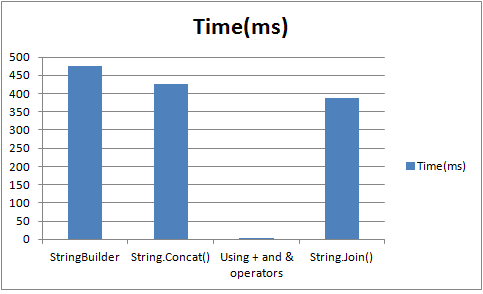
Now you will realize that, the fastest performing method is the string concatenation using + or &. But why? The reason is that, we were using fixed, exact strings aka constants and when the code is compiled to IL, It is optimized to form a single string in background.
As you can see..
IL_0151:  stloc.s    V_7
IL_0153:  br.s       IL_0163
IL_0155:  ldstr      "This is  yet  another  string  for  calculating performance"
IL_015a:  stloc.s    V_6
IL_015c:  nop
The results
Using Fixed Strings
1.2 String Concatenations of Variable strings.
The situation mentioned in 1.1 is highly unlikey. In real world we encounter variables, where length of strings vary.
Console.WriteLine("Using Variables")
 Console.WriteLine("=======================================================")
 Console.WriteLine()
 Console.WriteLine()
 Dim one As String = "This"
 Dim two As String = " is "
 Dim three As String = " yet "
 Dim four As String = " another "
 Dim five As String = " string "
 Dim six As String = " calculating "
 Dim seven As String = " performance "
 stopWatch.Restart()
 For i = 0 To count
 Dim stringBuilder As New StringBuilder()
 stringBuilder.Append(one).Append(two).Append(three).Append(four).Append(five).Append(six).Append(seven)
 Next
 stopWatch.Stop()
 Console.WriteLine("Variable strings : Using StringBuilder in " & stopWatch.ElapsedMilliseconds & " ms.")
 stopWatch.Restart()
 For i = 0 To count
 Dim currentVal As String = String.Concat(one, two, three, four, five, six, seven)
 Next
 stopWatch.Stop()
 Console.WriteLine("Variable strings : Using String.Concat in " & stopWatch.ElapsedMilliseconds & " ms.")
stopWatch.Restart()
 For i = 0 To count
 Dim currentVal As String = one + two + three + four + five + six + seven
 Next
 stopWatch.Stop()
 Console.WriteLine("Variable strings : Using & or + in " & stopWatch.ElapsedMilliseconds & " ms.")
stopWatch.Restart()
 For i = 0 To count
 Dim currentVal As String = String.Join("", one, two, three, four, five, six, seven)
 Next
 stopWatch.Stop()
 Console.WriteLine("Variable strings : Using String.Join in " & stopWatch.ElapsedMilliseconds & " ms.")
Console.ReadKey()
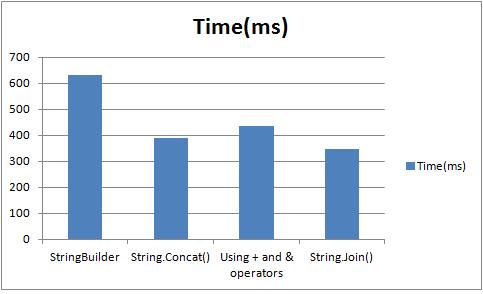
Now the results are totally different. String.Join() seems to perform the best. But having an empty delimiter sounds an unfit and a bit confusing. Concatenation using (+ or &) is now showing its real colour, it is performing slower than String.Join() and String.Concat().
2. String Concatenation of large sets
The iteration count is reduced to 10000 iterations. Each iteration of the loops concatenates the strings. String.Concat and String.Join is omitted, as these methods are static.
Console.WriteLine("Large String Concatenations")
 Console.WriteLine("=======================================================")
 Console.WriteLine()
 Console.WriteLine()
count = 10000
 stopWatch.Restart()
 Dim largeStringBuilder As New StringBuilder()
 For i = 0 To count
 largeStringBuilder.Append(one).Append(two).Append(three).Append(four).Append(five).Append(six).Append(seven)
 Next
stopWatch.Stop()
 Console.WriteLine("Large strings : Using StringBuilder in " & stopWatch.ElapsedMilliseconds & " ms.")
 stopWatch.Restart()
Dim concatString As String = String.Empty
 For i = 0 To count
 concatString += one + two + three + four + five + six + seven
 Next
stopWatch.Stop()
 Console.WriteLine("Large strings : Using & or + in " & stopWatch.ElapsedMilliseconds & " ms.")
Console.ReadKey()
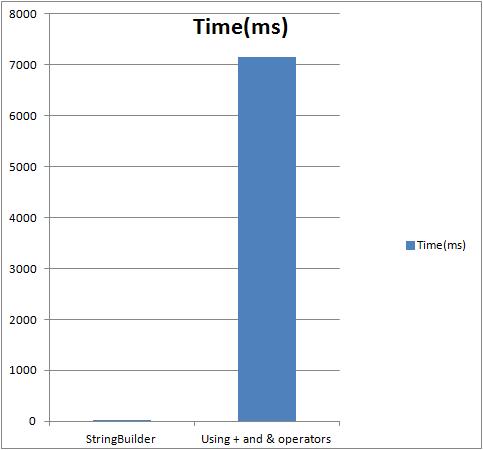
Following is the result obtained for the code above.
For large number of concatenations
Conclusion
Using, + or & is for sting Concatenation is BAD.
For two reason.
Performance
Wastage of Memory
When ever we do string concat using + or &, each time a new string is initialized in the memory, the existing values are copied to the form the new concatenated string. This is proven inefficient when concatenating large collection of strings.
Using String.Join()
String.Join will be useful if you have delimiter. It performs well too. But having an empty delimiter in my opinion would be bad too as it sounds inappropriate to have an empty delimiter. This a shared method, the values are joined and then returned as String.
Using String.Concat
This is also a Static Methods(Shared in VB.NET). This method has multiple overloads, which takes String arrays, object Arrays etc. The total length of the concatenated string is calculated beforehand joining the strings, and memory is allocated based on known length of strings passed. This method is the “best” fit especially when concatenating small set of strings.
Using StringBuilder
StringBuilder will be performing better when are 100s of string concatenation as seen in the section (2), The technique is to pre-allocate some volume of buffer memory and when performing methods such as Append(), AppendLine(), AppendFormat() it adds the strings to this pool. When it runs out of memory it copies the buffer to a much larger space. StringBuilder also helps when strings are added intermediately. It is especially useful when the number of the string are unkown or the collection of strings is too large and/or strings are need to be entered intermediately.
Comparing with String.Concat, StringBuilder is good for the aforesaid reasons. On the other hand, when the concatenation is performed only for small set of strings, using String.Concat / Join will be a better option as it ensures better performance and optimal usage of memory.
For a more detailed outlook on this subject : Refer Mr. Jon Skeet’s article.
Code run is an amazing cloud based services provider for programmers and developers. I have recently tried out code run Studio aka IDE by which we can develop websites with browser based IDE’s.
To much amusement, the IDE pretty much has a style of Visual Studio, with rich intellisense and with debugging options. My attempt is to take you to a simple walkthrough to ASP.NET development in CODE RUN.
To create a project, got to NEW>Project
New Project in CODERUN
It will pop up, a new Javascript modal, as shown below. Believe this what a web dev want, especially those who are learning web languages, or want to try something without installing and configuring the paths etc. etc.. Cloudrun has a great level of abstraction and transparency. The studio provides lots of templates categoriesed into sections such as C-sharp, Javascript and PHP. Well, I havn’t seen a VB.NET option. But there are a bunch templates for Csharp, including silverlight, A facebook template, an ASP.NET MVC application, ASP.NET Website and WebApplication, An ASMX webservice template and WPF browser based application(Though I found xaml extensions, I havn’t XBAP extensions).
Project Templates in CODERUN
In the Javascript section, there is the JQueryUI application, what it creates is a simple example, an html page of JQueryUI features. What the only difference with the sample page provide by the offical JQueryUI is the theme. So I ask why?
One which I try to exemplify is the ASP.NET dev in the cloud using CODE run. There is a document editor, but there is no view of it. For those who love to design by code than by drag and drop methods,they will love it. There is a side panel with a tree control with the list of file, which simulate the solution explorer, Right click it and you can add new items. When I clicked the run button, a new browser window popped up which took a bit of time. But sometimes worked bit oddly and showed some invalid exceptions.
Document editor
The Solution Explorer
In the codebehind file, The intellisense which I found was amazing. Though it is not that intelligent a visual studio is, there is a great level of brilliance shown by the devs of Coderun in implementing an appealing, stunning, intelliSense featured web based IDE.











 Develop!