
There are many ways you can concat strings in .NET, The question is which of this will be the fastest and better performing. Well, the fastest method of concatenation depends upon the number strings you concat. Below are three different tests conducted which could enable us to understand which one of the method is the most suitable in a particular context.
1. Small Set of Strings
1.1 For set of fixed strings.
Console.WriteLine("Using Fixed Strings")
 Console.WriteLine("=======================================================")
 Console.WriteLine()
 Console.WriteLine()
 Dim stopWatch As New Stopwatch()
stopWatch.Start()
Dim count As Integer = 1000000
For i = 0 To count
Dim currentVal As New StringBuilder
 currentVal.Append("This").Append(" is ").Append(" yet ").Append(" another ").Append(" string ").Append(" for ").Append(" calculating ").Append(" performance ")
 Next
stopWatch.Stop()
 Console.WriteLine("Fixed strings : StringBuilder in " & stopWatch.ElapsedMilliseconds & " ms.")
stopWatch.Restart()
 For i = 0 To count
 Dim currentVal As String = String.Concat("This ", "is ", " yet ", " another ", " string ", " for ", " calculating ", "performance")
 Next
 stopWatch.Stop()
 Console.WriteLine("Fixed strings : String Concat in " & stopWatch.ElapsedMilliseconds & " ms.")
 stopWatch.Restart()
For i = 0 To count
 Dim currentVal As String = "This " + "is " + " yet " + " another " + " string " + " for " + " calculating " + "performance"
 Next
stopWatch.Stop()
 Console.WriteLine("Fixed strings : String Concat using & and + operators in " & stopWatch.ElapsedMilliseconds & " ms.")
 stopWatch.Restart()
For i = 0 To count
 String.Join("", "This ", "is ", " yet ", " another ", " string ", " for ", " calculating ", "performance")
 Next
stopWatch.Stop()
 Console.WriteLine("Fixed strings : String.Join in " & stopWatch.ElapsedMilliseconds & " ms.")
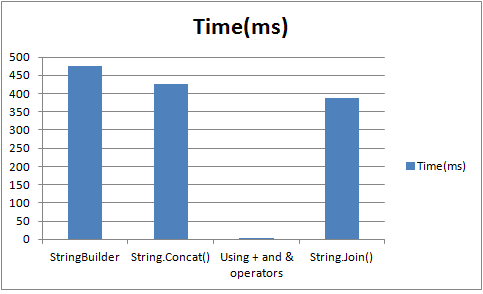
Now you will realize that, the fastest performing method is the string concatenation using + or &. But why? The reason is that, we were using fixed, exact strings aka constants and when the code is compiled to IL, It is optimized to form a single string in background.
IL_0151:  stloc.s    V_7
IL_0153:  br.s       IL_0163
IL_0155:  ldstr      "This is  yet  another  string  for  calculating performance"
IL_015a:  stloc.s    V_6
IL_015c:  nop
The results
1.2 String Concatenations of Variable strings.
The situation mentioned in 1.1 is highly unlikey. In real world we encounter variables, where length of strings vary.
Console.WriteLine("Using Variables")
 Console.WriteLine("=======================================================")
 Console.WriteLine()
 Console.WriteLine()
 Dim one As String = "This"
 Dim two As String = " is "
 Dim three As String = " yet "
 Dim four As String = " another "
 Dim five As String = " string "
 Dim six As String = " calculating "
 Dim seven As String = " performance "
 stopWatch.Restart()
 For i = 0 To count
 Dim stringBuilder As New StringBuilder()
 stringBuilder.Append(one).Append(two).Append(three).Append(four).Append(five).Append(six).Append(seven)
 Next
 stopWatch.Stop()
 Console.WriteLine("Variable strings : Using StringBuilder in " & stopWatch.ElapsedMilliseconds & " ms.")
 stopWatch.Restart()
 For i = 0 To count
 Dim currentVal As String = String.Concat(one, two, three, four, five, six, seven)
 Next
 stopWatch.Stop()
 Console.WriteLine("Variable strings : Using String.Concat in " & stopWatch.ElapsedMilliseconds & " ms.")
stopWatch.Restart()
 For i = 0 To count
 Dim currentVal As String = one + two + three + four + five + six + seven
 Next
 stopWatch.Stop()
 Console.WriteLine("Variable strings : Using & or + in " & stopWatch.ElapsedMilliseconds & " ms.")
stopWatch.Restart()
 For i = 0 To count
 Dim currentVal As String = String.Join("", one, two, three, four, five, six, seven)
 Next
 stopWatch.Stop()
 Console.WriteLine("Variable strings : Using String.Join in " & stopWatch.ElapsedMilliseconds & " ms.")
Console.ReadKey()
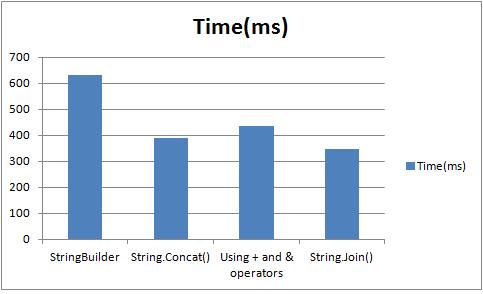
Now the results are totally different. String.Join() seems to perform the best. But having an empty delimiter sounds an unfit and a bit confusing. Concatenation using (+ or &) is now showing its real colour, it is performing slower than String.Join() and String.Concat().
2. String Concatenation of large sets
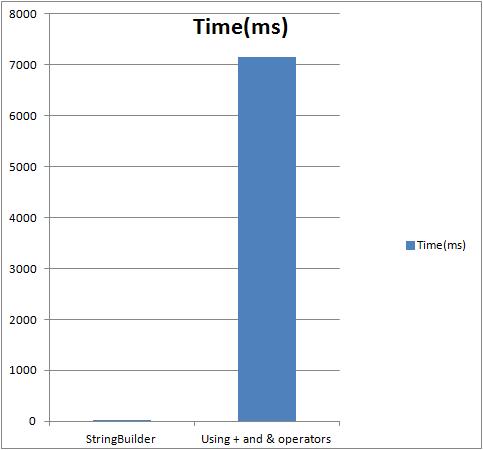
The iteration count is reduced to 10000 iterations. Each iteration of the loops concatenates the strings. String.Concat and String.Join is omitted, as these methods are static.
Console.WriteLine("Large String Concatenations")
 Console.WriteLine("=======================================================")
 Console.WriteLine()
 Console.WriteLine()
count = 10000
 stopWatch.Restart()
 Dim largeStringBuilder As New StringBuilder()
 For i = 0 To count
 largeStringBuilder.Append(one).Append(two).Append(three).Append(four).Append(five).Append(six).Append(seven)
 Next
stopWatch.Stop()
 Console.WriteLine("Large strings : Using StringBuilder in " & stopWatch.ElapsedMilliseconds & " ms.")
 stopWatch.Restart()
Dim concatString As String = String.Empty
 For i = 0 To count
 concatString += one + two + three + four + five + six + seven
 Next
stopWatch.Stop()
 Console.WriteLine("Large strings : Using & or + in " & stopWatch.ElapsedMilliseconds & " ms.")
Console.ReadKey()
Following is the result obtained for the code above.
Conclusion
Using, + or & is for sting Concatenation is BAD.
For two reason.
- Performance
- Wastage of Memory
When ever we do string concat using + or &, each time a new string is initialized in the memory, the existing values are copied to the form the new concatenated string. This is proven inefficient when concatenating large collection of strings.
Using String.Join()
String.Join will be useful if you have delimiter. It performs well too. But having an empty delimiter in my opinion would be bad too as it sounds inappropriate to have an empty delimiter. This a shared method, the values are joined and then returned as String.
Using String.Concat
This is also a Static Methods(Shared in VB.NET). This method has multiple overloads, which takes String arrays, object Arrays etc. The total length of the concatenated string is calculated beforehand joining the strings, and memory is allocated based on known length of strings passed. This method is the “best” fit especially when concatenating small set of strings.
Using StringBuilder
StringBuilder will be performing better when are 100s of string concatenation as seen in the section (2), The technique is to pre-allocate some volume of buffer memory and when performing methods such as Append(), AppendLine(), AppendFormat() it adds the strings to this pool. When it runs out of memory it copies the buffer to a much larger space. StringBuilder also helps when strings are added intermediately. It is especially useful when the number of the string are unkown or the collection of strings is too large and/or strings are need to be entered intermediately.
Comparing with String.Concat, StringBuilder is good for the aforesaid reasons. On the other hand, when the concatenation is performed only for small set of strings, using String.Concat / Join will be a better option as it ensures better performance and optimal usage of memory.
For a more detailed outlook on this subject : Refer Mr. Jon Skeet’s article.
The photo used is by : http://www.flickr.com/photos/thurm/ Used under creative commns licence. Original used is : http://www.flickr.com/photos/thurm/1313763819/sizes/l/in/photostream/
 Develop!
Leave a comment