
The intention of this post is NOT to suggest any particular method for performing equality check but just to show some interesting data related to performance when equality check is done for some of the fundamental datatypes in .NET.
How the test is done
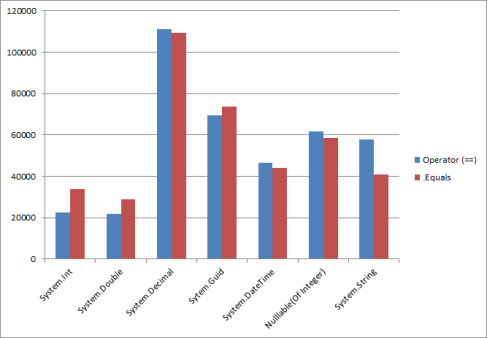
A collection of million items of the data type is stored into a list. Iterating through the items in the collection, each item is checked for equality with another value. Time taken for checking the equality is noted. The chart shown below shows the results obtained. The value along the y axis denotes the time in ticks, where as on the x axis, the datatype used to perform the test. Lower the value in y axis, faster it is.
Conclusions
The following can be deduced
- Equality check using == operator for System.Int32 and Double are considerably faster than .Equals() method.
- Decimal, Guid, DateTime and Nullable(Of Integer) have almost same performance cost for .Equals() and == methods.
- .Equals() method, compared to == operator does faster equality checks for Strings
   Dim stopWatch As New Stopwatch

        Dim nullableIntList As New List(Of Nullable(Of Integer))
        Dim intList As New List(Of Integer)

        Dim doubleList As New List(Of Double)
        Dim decimalList As New List(Of Decimal)

        Dim guidList As New List(Of Guid)
        Dim dateList As New List(Of DateTime)

        Dim stringList As New List(Of String)
        Dim startDate As New DateTime(1, 1, 1)

        For i As Integer = 0 To 1000000

            nullableIntList.Add(i)
            intList.Add(i)
            doubleList.Add(CDbl(i))
            decimalList.Add(CDec(i))

            guidList.Add(New Guid)

            dateList.Add(startDate)
            stringList.Add(startDate.ToLongDateString)
            startDate = startDate.AddDays(1)

        Next

        Dim checkResult As Boolean = False
        Dim intToCompare As Integer = intToCompare

        stopWatch.Start()

        For Each nullableInt In intList

        Next

        stopWatch.Stop()

        Debug.WriteLine("looping throught items took " & stopWatch.ElapsedTicks)
        stopWatch.Restart()

        For Each nullableInt In intList
            checkResult = (nullableInt = intToCompare)
        Next

        stopWatch.Stop()

        Debug.WriteLine("== for Nullable Int took (ticks)" & stopWatch.ElapsedTicks)
        Debug.WriteLine("== for Nullable  Int took (ms)" & stopWatch.ElapsedMilliseconds)

        stopWatch.Restart()
        For Each nullableInt In nullableIntList
            checkResult = (nullableInt.Equals(intToCompare))
        Next

        stopWatch.Stop()

        Debug.WriteLine(".Equals for Nullable Int took (ticks)" & stopWatch.ElapsedTicks)
        Debug.WriteLine(".Equals for Nullable Int took (ms)" & stopWatch.ElapsedMilliseconds)

        stopWatch.Restart()
        For Each intItem In intList
            checkResult = (intItem = intToCompare)
        Next

        stopWatch.Stop()

        Debug.WriteLine("== for Int took (ticks)" & stopWatch.ElapsedTicks)
        Debug.WriteLine("== for Int took (ms)" & stopWatch.ElapsedMilliseconds)

        stopWatch.Restart()
        For Each intItem In intList
            checkResult = (intItem.Equals(intToCompare))
        Next

        stopWatch.Stop()

        Debug.WriteLine(".Equals for Int took (ticks)" & stopWatch.ElapsedTicks)
        Debug.WriteLine(".Equals for Int took (ms)" & stopWatch.ElapsedMilliseconds)

        Dim doubleToCompare As Double = 3.4

        stopWatch.Restart()
        For Each dblItem In doubleList
            checkResult = (dblItem = doubleToCompare)
        Next

        stopWatch.Stop()

        Debug.WriteLine("== for Double took (ticks)" & stopWatch.ElapsedTicks)
        Debug.WriteLine("== for Double took (ms)" & stopWatch.ElapsedMilliseconds)

        stopWatch.Restart()
        For Each dblItem In doubleList
            checkResult = (dblItem.Equals(doubleToCompare))
        Next

        stopWatch.Stop()

        Debug.WriteLine(".Equals for Double took (ticks)" & stopWatch.ElapsedTicks)
        Debug.WriteLine(".Equals for Double took (ms)" & stopWatch.ElapsedMilliseconds)

        Dim decimalToCompare As Decimal = 3.4D

        stopWatch.Restart()
        For Each decItem In decimalList
            checkResult = (decItem = decimalToCompare)
        Next

        stopWatch.Stop()

        Debug.WriteLine("== for Decimal took (ticks)" & stopWatch.ElapsedTicks)
        Debug.WriteLine("== for Decimal took (ms)" & stopWatch.ElapsedMilliseconds)

        stopWatch.Restart()
        For Each decItem In decimalList
            checkResult = (decItem.Equals(decimalToCompare))
        Next

        stopWatch.Stop()

        Debug.WriteLine(".Equals for Decimal took (ticks)" & stopWatch.ElapsedTicks)
        Debug.WriteLine(".Equals for Decimal took (ms)" & stopWatch.ElapsedMilliseconds)

        Dim guidToCompare As Guid = New Guid

        stopWatch.Restart()
        For Each guidItem In guidList
            checkResult = (guidItem = guidToCompare)
        Next

        stopWatch.Stop()

        Debug.WriteLine("== for Guid took (ticks)" & stopWatch.ElapsedTicks)
        Debug.WriteLine("== for Guid took (ms)" & stopWatch.ElapsedMilliseconds)

        stopWatch.Restart()
        For Each guidItem In guidList
            checkResult = (guidItem.Equals(guidToCompare))
        Next

        stopWatch.Stop()

        Debug.WriteLine(".Equals for Guid took (ticks)" & stopWatch.ElapsedTicks)
        Debug.WriteLine(".Equals for Guid took (ms)" & stopWatch.ElapsedMilliseconds)

        Dim dateToCompare As DateTime = DateTime.Now.Date

        stopWatch.Restart()

        For Each dateItem In dateList
            checkResult = (dateToCompare = dateItem)
        Next

        stopWatch.Stop()

        Debug.WriteLine("== for DateTime took (ticks)" & stopWatch.ElapsedTicks)
        Debug.WriteLine("== for DateTime took (ms)" & stopWatch.ElapsedMilliseconds)

        stopWatch.Restart()

        For Each dateItem In dateList
            checkResult = (dateItem.Equals(dateItem))
        Next

        stopWatch.Stop()

        Debug.WriteLine(".Equals for DateTime took (ticks)" & stopWatch.ElapsedTicks)
        Debug.WriteLine(".Equals for DateTime took (ms)" & stopWatch.ElapsedMilliseconds)

        Dim stringToCompare As String = "Hello World!"

        stopWatch.Restart()

        For Each stringItem In stringList
            checkResult = (stringItem = stringToCompare)
        Next

        stopWatch.Stop()

        Debug.WriteLine("== for String took (ticks)" & stopWatch.ElapsedTicks)
        Debug.WriteLine("== for String took (ms)" & stopWatch.ElapsedMilliseconds)

        stopWatch.Restart()

        For Each stringItem In stringList
            checkResult = (stringItem.Equals(stringToCompare))
        Next

        stopWatch.Stop()

        Debug.WriteLine(".Equals for String took (ticks)" & stopWatch.ElapsedTicks)
        Debug.WriteLine(".Equals for String took (ms)" & stopWatch.ElapsedMilliseconds)

        Console.ReadKey()
 Develop!